Set calorie and macro goals in SeeMeEat

Short answer
You can set your own daily targets in SeeMeEat, or use its optional adult goal planner, which shows every step of its math before you apply anything. The planner uses the Mifflin–St Jeor equation, runs on your phone and saves only the goal you apply. Suggestions explain their reasoning and never change your targets on their own, and exercise calories are never added back.
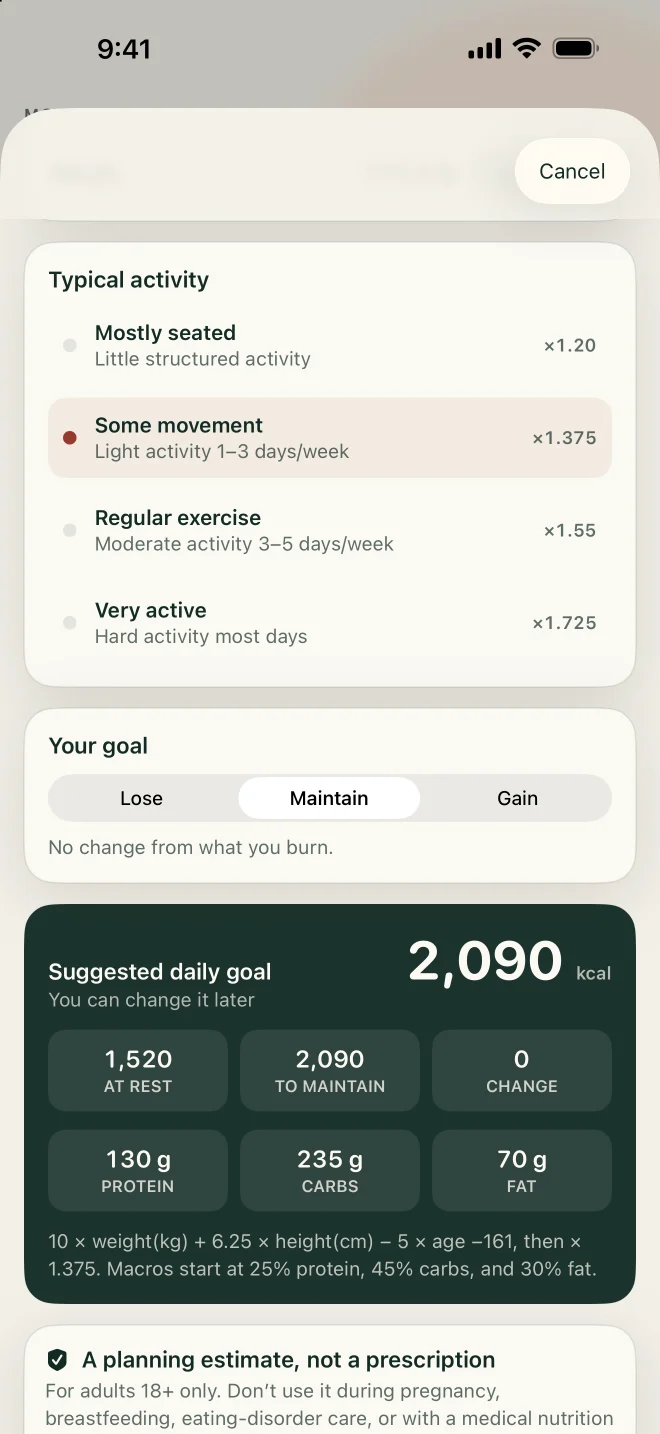
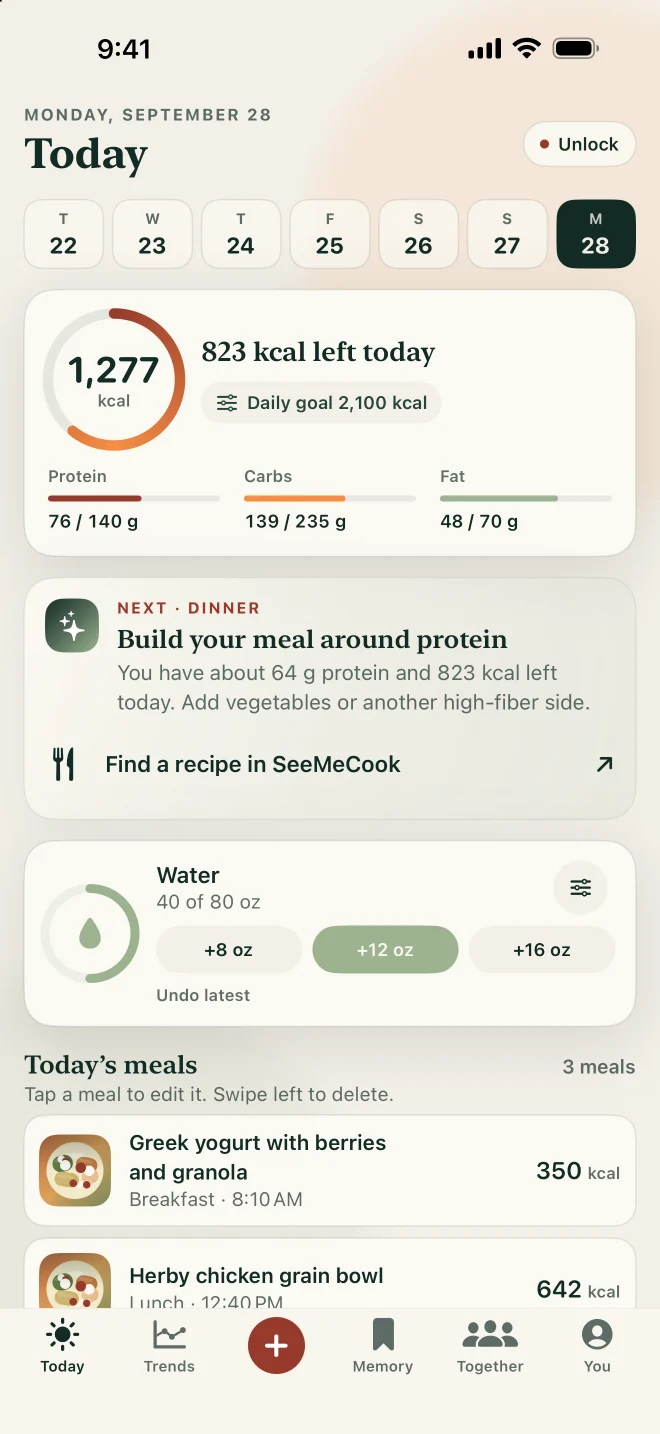
Screens from the iPhone app with demo data.
On this page
How does the goal planner work?
It estimates your maintenance calories in two steps and shows you both. First it calculates resting energy with the Mifflin–St Jeor equation:
- Men: 10 × weight in kg + 6.25 × height in cm − 5 × age in years + 5
- Women: 10 × weight in kg + 6.25 × height in cm − 5 × age in years − 161
Then it multiplies resting energy by an activity factor for your usual week, and applies the preset you choose:
| Your usual week | Activity factor |
|---|---|
| Mostly seated | 1.2 |
| Some movement | 1.375 |
| Regular exercise | 1.55 |
| Very active | 1.725 |
The presets are "Ease down," 250 calories below maintenance; "Maintain"; and "Ease up," 250 calories above. You see the resting energy, the factor and the adjustment before anything is applied.
For example, for a 30-year-old woman who is 168 cm (5 ft 6 in) tall, weighs 75 kg (165 lb) and gets some movement in her week, the planner shows resting energy of about 1,490 calories and maintenance of about 2,050. With "Ease down," her target would be 1,800.
What limits does the planner use?
It keeps planned targets within fixed limits. A planned target is never below your estimated resting energy or 1,000 calories, whichever is higher, and never above 5,000. Targets are rounded to the nearest 10 calories.
What do you see each day?
Your journal shows calories, macros and micronutrients at a glance, on a real calendar with meal periods, alongside water and weight. Personal trends over 7 to 365 days show how many days you actually logged and how confident each signal is.
Why doesn't SeeMeEat add exercise calories back?
Because the activity factor already counts your activity. Adding a tracker's exercise estimate on top would count the same movement twice, so SeeMeEat never adds exercise calories back to your target.
What does the planner keep?
Only the goal you apply. The planner runs on your phone, and it saves the daily goal you choose, not the inputs you used to calculate it, such as your weight, height and age.
Do suggestions ever change your goals?
Not without you. SeeMeEat's suggestions explain their reasoning, and they never silently change your targets. You decide whether to act on them.
Why Mifflin–St Jeor?
Because a 2005 systematic review found it the most reliable of the four resting-energy equations most used in practice. It came within 10 percent of measured resting energy for more people than any other. The equation was published in 1990 from measurements of 498 healthy adults aged 19 to 78. The same review noted noteworthy errors for some individuals, which is why your own weight trend is the final check.
Common questions
Can I set my own numbers instead?
Yes. The planner is optional. You can set your own targets directly, for example ones agreed with a dietitian or clinician.
Is the planner right for everyone?
It's an adult planner, and the equation was built from healthy adults. If you're pregnant or breastfeeding, have a medical condition that affects your metabolism, or have a history of disordered eating, set your targets with a clinician.
Why is "Ease down" only 250 calories?
It's a gentle default. A 2013 U.S. obesity guideline suggests deficits of 500 to 750 calories a day for adults with overweight or obesity, and you can set a target like that yourself if it suits you.
Sources
- SeeMeEat: AI Calorie Tracker on the App Store. apps.apple.com
- SeeMeEat on Google Play. play.google.com
- Mifflin MD, St Jeor ST, Hill LA, Scott BJ, Daugherty SA, Koh YO. A new predictive equation for resting energy expenditure in healthy individuals. American Journal of Clinical Nutrition. 1990;51(2):241–247. pubmed.ncbi.nlm.nih.gov
- Frankenfield D, Roth-Yousey L, Compher C. Comparison of predictive equations for resting metabolic rate in healthy nonobese and obese adults: a systematic review. Journal of the American Dietetic Association. 2005;105(5):775–789. pubmed.ncbi.nlm.nih.gov
- Jensen MD, Ryan DH, Apovian CM, et al. 2013 AHA/ACC/TOS guideline for the management of overweight and obesity in adults. Circulation. 2014;129(25 Suppl 2):S102–S138. pubmed.ncbi.nlm.nih.gov
Nutrition results are estimates, not medical advice.
Written by the SeeMeEat editorial team under a pen name.